You travel, and Drogowieść tells you about interesting places nearby — the castles, churches, nature reserves and small towns you are passing right now. It picks what is worth hearing by itself, so you never have to take your eyes off the road.
Stories are in Polish. The app currently narrates only in Polish; an English version is planned.
How it works
Switch it on and go
By car, by bike or on foot. The app follows your direction of travel and looks at what is ahead of you and to the sides.
Listen to the stories
A short story about each place, read aloud by your phone — at the right moment, before you pass it.
Collect discoveries
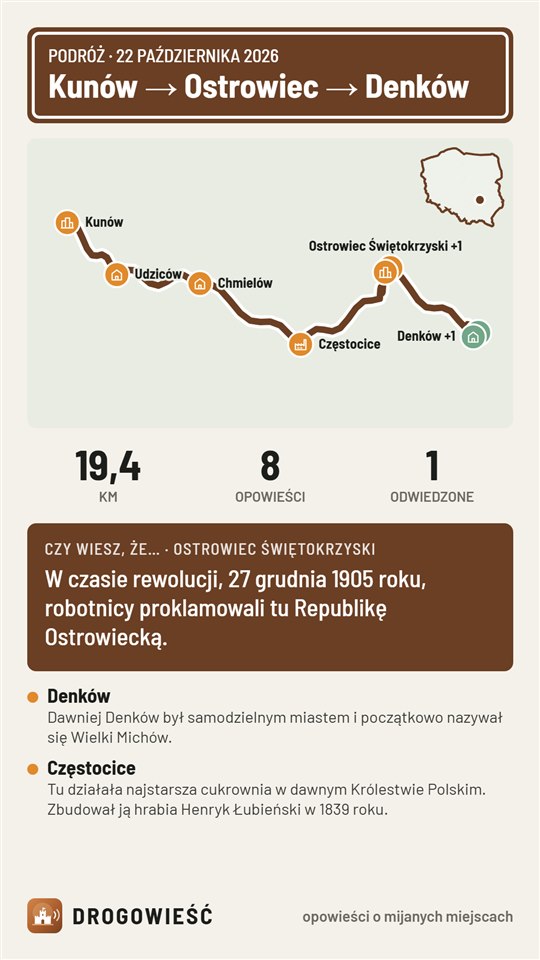
Places you visited and trips you made stay with you — come back to them whenever you like. After each trip you can also send friends a picture with a small map and a fun fact.
This is how a story sounds
An excerpt from the app — one of about 2,200 ready-made stories (in Polish, English translation below).
Cała historia tej wieży zaczęła się od wygranego telewizora. W 1957 roku Edward Roczniak z Kielc przywiózł go na Łysą Górę, żeby sprawdzić, czy złapie telewizję z Warszawy. Odbiór był tak dobry, że zostawił aparat pod opieką klasztoru. Dziś stoi tu wieża wysoka na 157 metrów, a jej sygnał dociera do blisko 2,5 miliona ludzi.
English: The whole story of this tower began with a television set someone had won. In 1957 Edward Roczniak from Kielce brought it to Łysa Góra to check whether it could receive television from Warsaw. Reception was so good that he left the set in the care of the monastery. Today a 157-metre tower stands here, and its signal reaches almost 2.5 million people.
“Listen” uses your browser’s Polish voice, which depends on the device and often sounds artificial on a computer. In the app, stories are read by the phone’s speech synthesizer, which usually sounds much more natural.
Pilot in the Świętokrzyskie region
We are testing in one region of Poland before we cover the whole country.
About 2,200 stories
ready-made, about places in the Świętokrzyskie region (in Polish)
Outside the region
works all over Poland — for now with short, rather plain introductions (internet needed); polished stories will be added gradually, also in the free version
Free
the test version has all features, no ads and no payments
Installation step by step
The app is not in the store yet, so you install it from a file. Button names may differ slightly depending on your phone (screenshots are in Polish).
- Download the fileOn your phone, tap “Download for Android”, then “Download” in the browser window. If the browser warns you about the file, choose “Download anyway”.
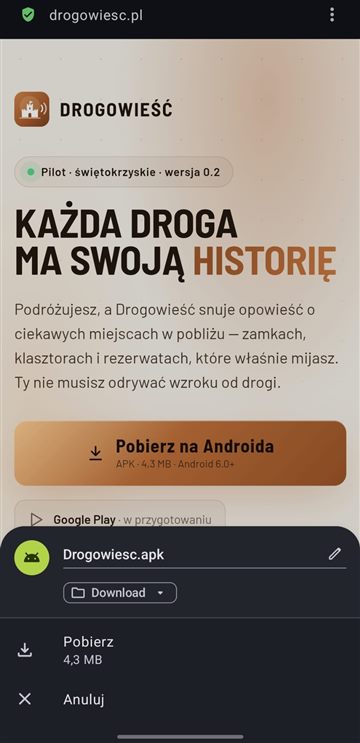
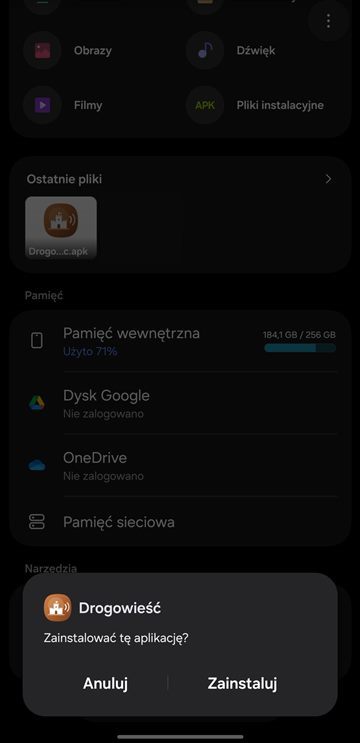
- Open the downloaded fileFrom the notification or the Downloads folder: Drogowiesc.apk, then “Install”.
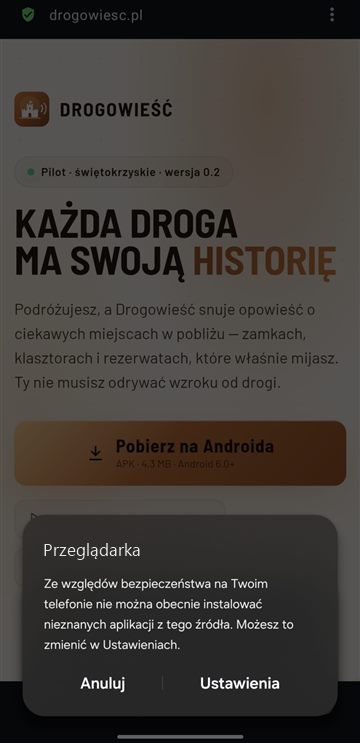
- Allow installing from this sourceYour phone asks during the first installation: “Settings” → turn on “Allow from this source” (on Samsung: “Grant permission”) → go back.
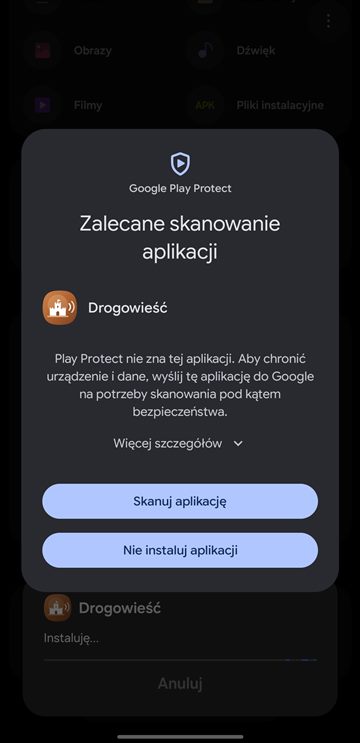
- Google Play ProtectGoogle checks every app from outside the store. Choose “Scan app”, then “Install” after a moment. On some phones: “More details” → “Install anyway”.
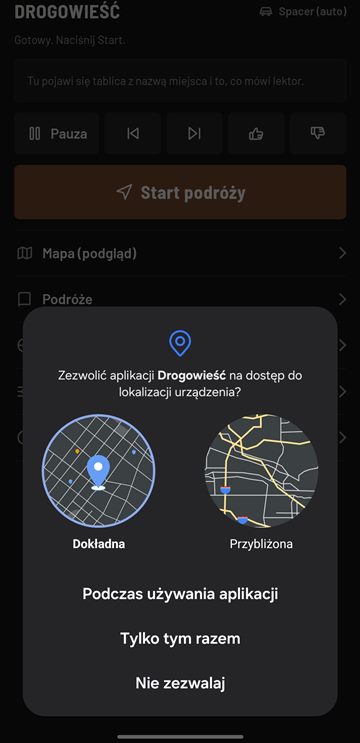
- First startAfter “Start trip”, allow location access (without it the app does not know what you are passing). Read the “Before you go” card.
Play Protect blocks the installation?
Some phones are stricter and require Google Play Protect to be turned off for the installation of apps from outside the store. It usually looks like below, but option names and locations may differ depending on the phone model.
- In your phone’s Settings, search for “Play Protect” — it is usually under “Security and privacy”, but the settings search finds it fastest.
- Open “Google Play Protect”, then its settings (the gear icon).
- Turn off “Scan apps with Play Protect”. The phone asks what next: “Pause” turns scanning off only until the next day, “Turn off” — permanently.
We recommend “Pause”: you install Drogowieść and protection comes back by itself the next day. If you choose “Turn off”, switch scanning back on after the installation.
Have an iPhone? Drogowieść in the browser
There is no iOS app yet, but you can listen to the stories in Safari — nothing to install.
- OpenTap the button above on your iPhone, in Safari.
- LocationAfter “Start”, allow the page to access your location.
- Screen onSettings → Display & Brightness → Auto-Lock → Never while driving.
- ChargerThe screen and GPS drain the battery faster — plug your phone into a charger in the car.
What’s next
Android pilot
APK file from this page, Świętokrzyskie region
Google Play
install and update from the store, more regions
iPhone
in Safari already, iOS app after Android
Help us improve the stories
Rate stories with 👍 / 👎. After a trip: Trips → Copy trip log (in the app: Podróże → Kopiuj dziennik podróży) and paste it into an e-mail. Every log helps us improve when and what the app talks about.